If they take your phone, it protects itself.
KapoGuard is a dead-man's-switch for Android, built for two moments in this order: someone standing over you demanding you unlock it right now, and the phone being taken from you, locked or not. Triggers you choose, an OS-level lockdown, and a factory wipe option.
Every trigger below except Wrong PIN wipe can be rehearsed in a safe TEST mode before you arm it for real. Wrong PIN wipe is always a real erase.
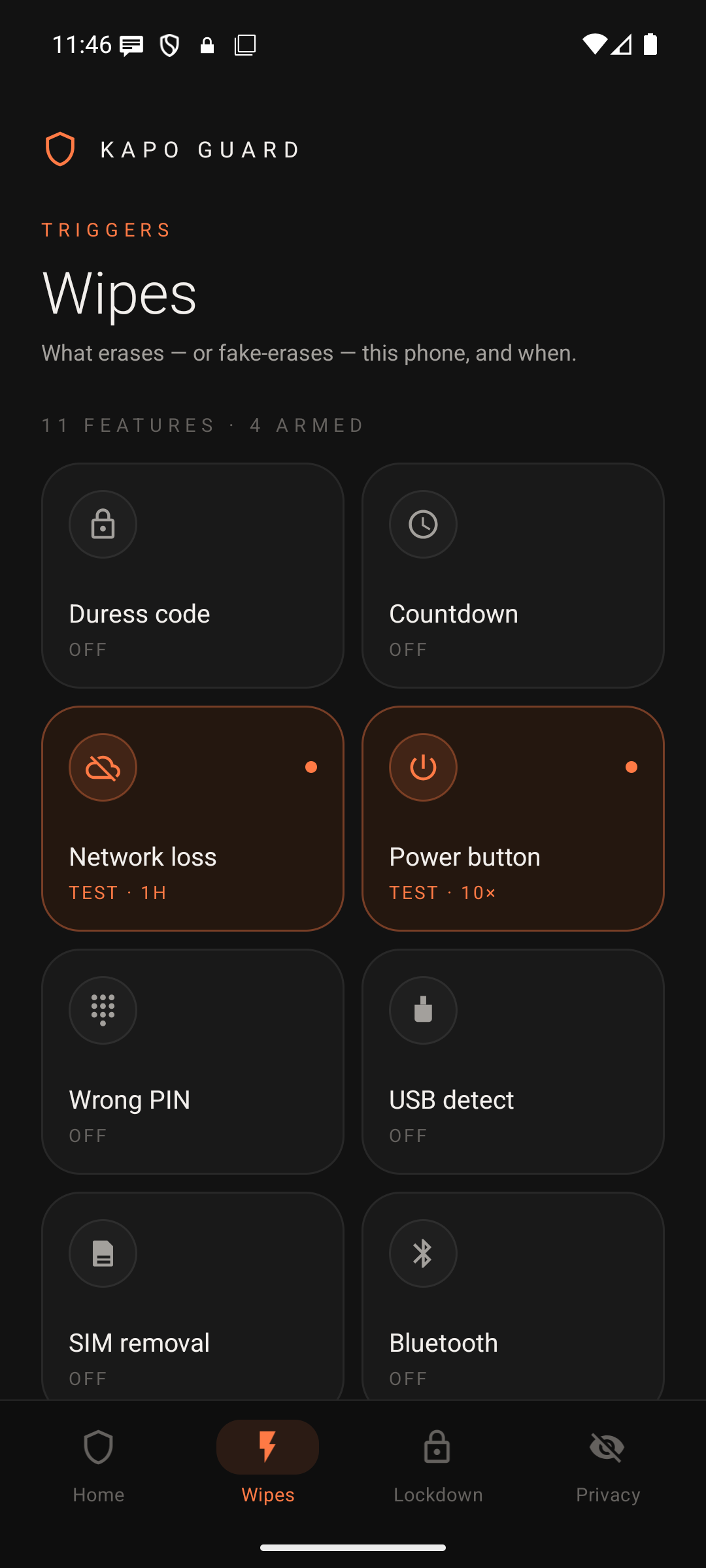
USB / OTG detect
Meant to fire when a cable or forensic-extraction tool connects while the phone is locked. On GrapheneOS the system blocks USB data while locked, so this trigger does not fire there. On other Android phones it depends on the watchdog running and has not been tested.
Duress code
A code of its own that you type on the lock screen. It fires whenever its digits are typed in a row, even inside something longer, so it must not sit inside your real PIN or your private code, or a normal unlock would set it off. Kapo Guard can't see your PIN, so it can't check this for you. Your screen lock must be a number PIN: the code is typed on the number pad, and with a password or pattern it may not be recognised.
Countdown
Arm a duration. Miss the check-in and it acts on its own — the fallback for being seized while distracted, with no chance to act.
SIM removal
Notices a SIM being physically pulled from a locked phone. Detection usually takes up to about 15 minutes and can take longer when the phone is idle. Nothing is detected before the first unlock after a restart.
Bluetooth proximity
Pick a trusted paired device — a watch, a keyfob. Any disconnect while locked sets it off, after the wait you set, if any: going out of range, the device switching off or running out of battery, or Bluetooth or airplane mode being turned off, including from the lock screen. This phone shutting down or restarting may count too. It has not been tested with a real accessory.
Geofence
Entering a zone you define — a border, an airport — can switch USB detect back on and start a countdown you've set. The zone itself never fires anything. Needs location switched on.
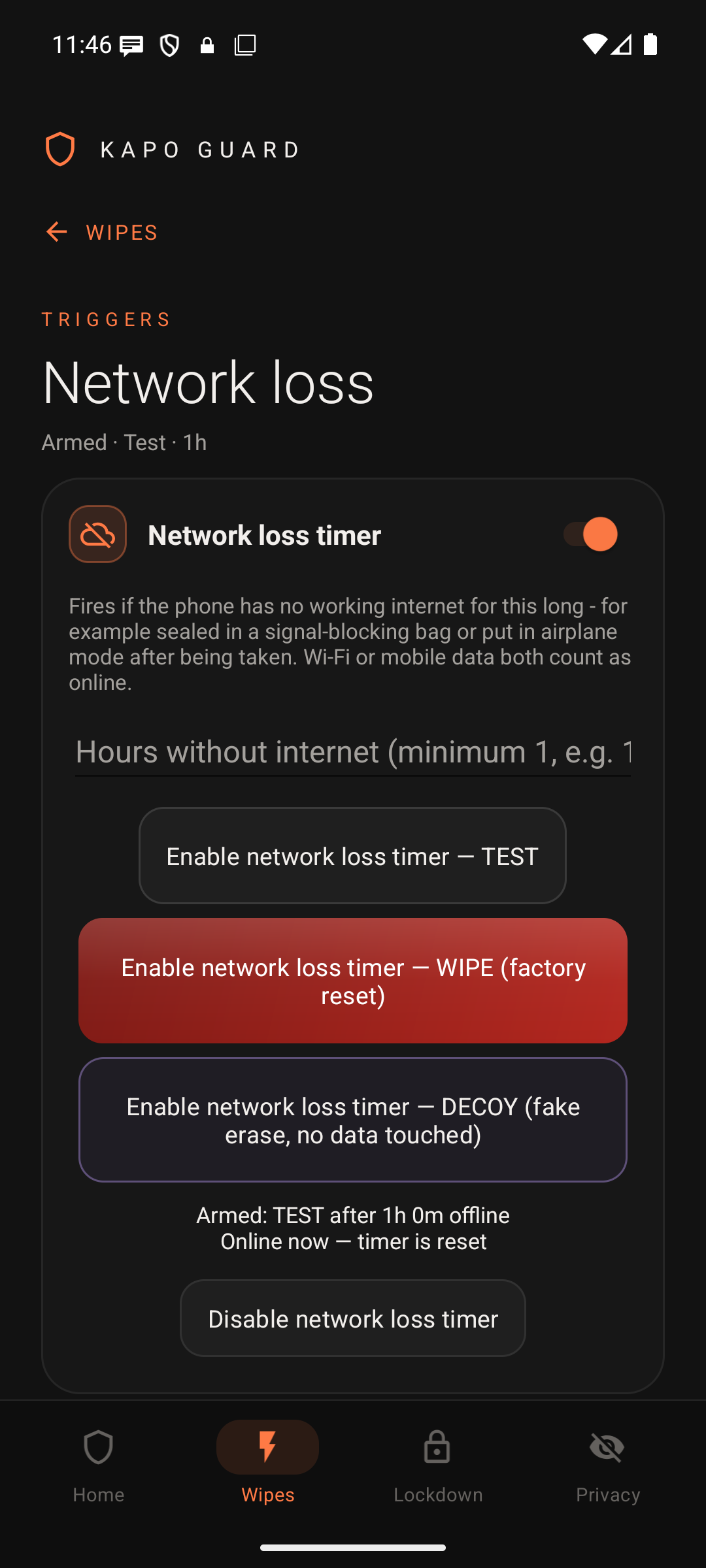
Network loss timer
No working internet for the hours you choose — sealed in a signal-blocking bag, or forced into airplane mode — and it fires on its own. Still works after a reboot, before anyone unlocks the phone.
Power button quick wipe
Press the power button 10 times fast. Works from the lockscreen, with no app to open and no screen to unlock. Android's Emergency SOS starts at 5 presses, so turn it off in Settings if you don't want it to start too.
Wrong PIN wipe
After the number of wrong lockscreen attempts you set, Android itself wipes the phone — enforced by the OS, so it works even if KapoGuard isn't running. The limit is set on the main side only, so do not rely on it for wrong PINs on the private lock screen. It has no TEST mode: it is always a real erase.
Wipe by text message
Send a secret word from any phone to an app on the main side of the phone, such as SMS or email, and it fires. Apps on the private side don't count, even while that side is open, and the app must show the message text in its notification. Its notification is removed the instant it arrives; the message itself stays in the app until the phone is erased.
A wipe is only as strong as what can stop it running
The triggers above can fire a real factory reset, a convincing decoy, or just a safe test notification — your choice, per trigger. Wrong PIN wipe can only do a real factory reset, and Geofence fires nothing itself: it only arms what you've set up. But the deeper protection is what KapoGuard does to the phone itself the moment it's set up as Device Owner, the same mechanism enterprises use to lock down company phones.
The rest of the toolkit, for the moments that aren't an emergency.
Decoy mode
An obviously-wiped phone can be used against you during active detainment. Decoy mode shows a convincing fake erase instead — nothing is actually touched.
App Lock
Lock any installed app behind its own numeric code — separate from your duress code on purpose.
KapoNotes
A companion notes app. The whole app opens only with its own passphrase, and every note is encrypted. Also available on its own →
Intruder photo
A silent front-camera photo on a wrong lockscreen attempt, kept inside the app, not in your gallery.
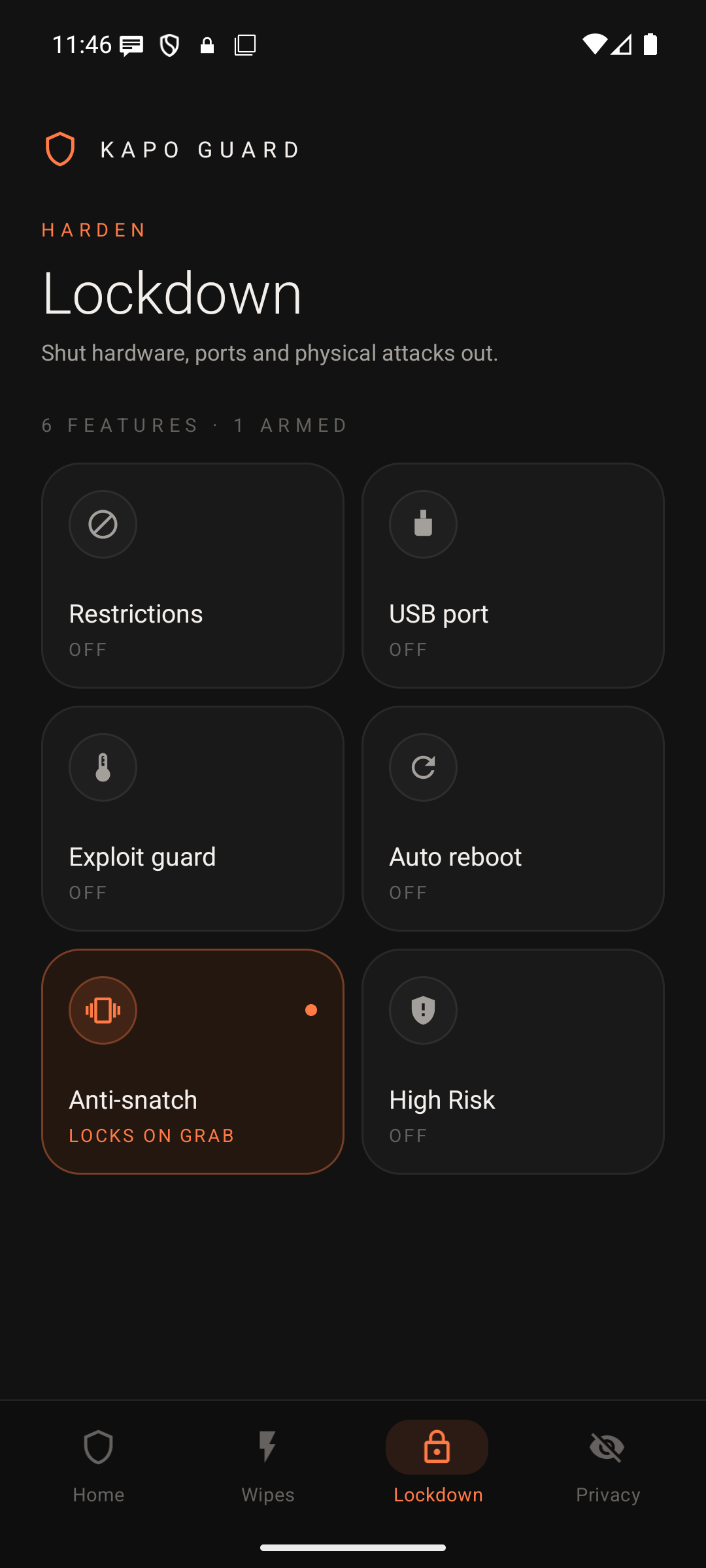
Auto reboot
Schedule the phone to reboot itself — after inactivity, or at a fixed time. A rebooted phone is cryptographically locked until the real passcode is entered once.
Silent alert
Texts one person you trust when a trigger fires. Before a wipe it waits at most 6 seconds for the text to send, then erases; with no signal or no SIM the text won't leave. Wrong PIN wipe sends no alert. Plain SMS, no account.
Anti-snatch
Locks the phone the instant it's yanked out of your hand while unlocked.
High Risk mode
Handing the phone over? For the time you set, every unlock is locked straight back and it restarts into its encrypted state every 10 minutes. It can't be stopped early.
Exploit protection
Reboots a locked phone back to its fully-encrypted state on signs of a hardware attack — sudden freezing, voltage glitching through the port, or a wireless-charging coil. Live sensor readings in the app.
Restrictions
Switch off what you don't need — 2G, NFC and UWB (on Android 14+), Bluetooth, camera, microphone, outgoing calls, SMS. Every one optional, so a daily phone keeps calls.
Private profile
Your normal phone becomes the decoy. A second code on the lockscreen opens a separate locked profile with your real apps.
USB port control
Block USB file transfer (MTP and PTP), always or just while locked. It does not stop forensic tools. A privacy layer on top of, not instead of, USB-detect above.
Inside the app
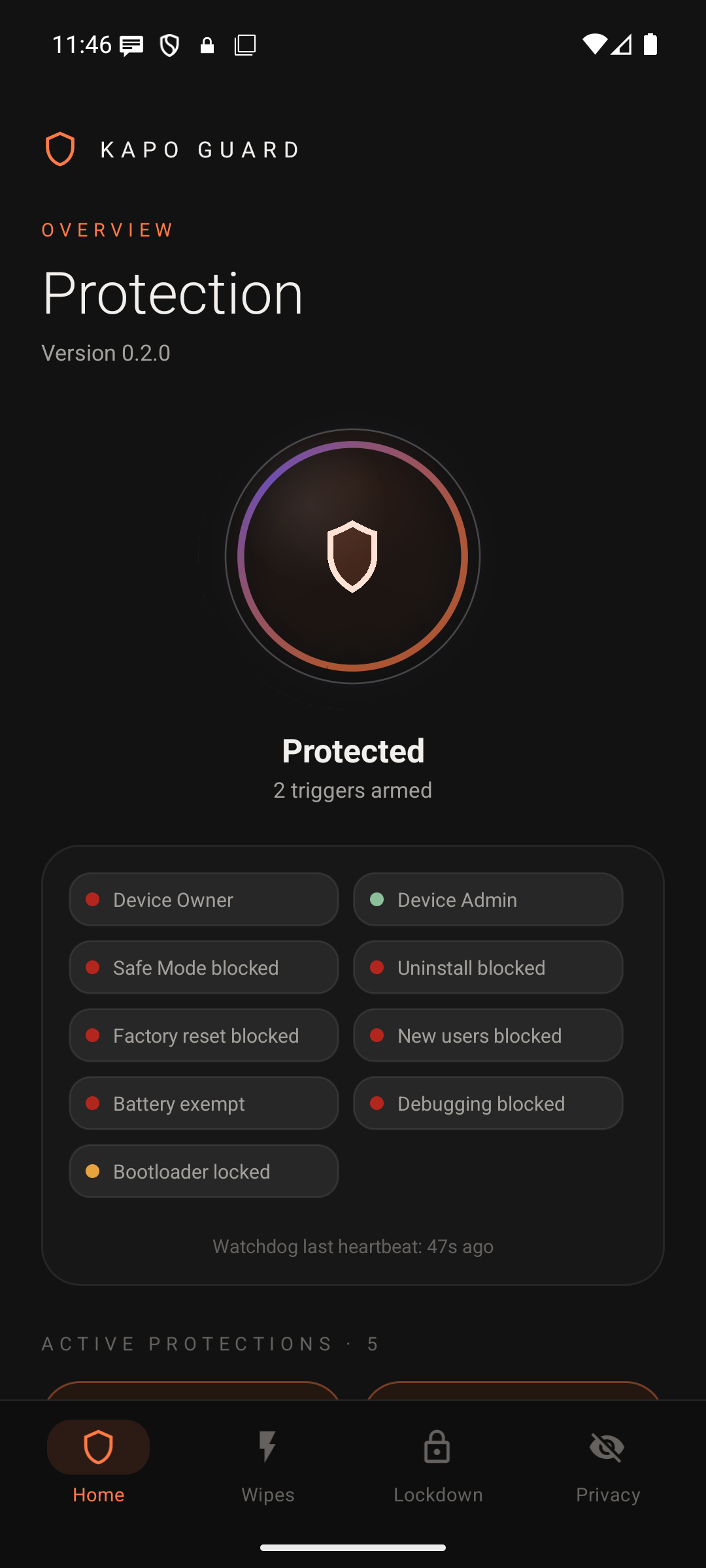
Protections sorted into tabs, with what's armed on Home. Tap a tile to set it up.
Why Device Owner, not just another app lock
What a typical anti-theft or app-locking app on the Play Store can't reach.
Lifetime licence
One payment. One phone. Yours for life.
- Every protection in Kapo Guard, unlocked on one phone. Many only work with Device Owner: see "Read before installing" below
- No subscription and no renewals
- Activates online. After that the licence is checked on the phone itself; entering the key again contacts our server
- Survives a factory reset only with Kapo Guard as Device Owner and the key entered after that. Otherwise activating again after a reset uses one of your 2 moves
- Moving to a new phone? Move it yourself, twice
- Pay in crypto — no account, no email, no name
Already bought? Get the user guide
The full guide (PDF) is for licence holders only. Enter your paid licence key to download it.
Get KapoGuard
Early access. Install it however you trust most.
USB installer: open it in Chrome or Edge on a computer, plug in a factory-reset phone with USB debugging on, and it installs KapoGuard, your chosen apps and privacy settings in one go.
Get a paid licence key first. Without one the app shows only its Activate screen. On a phone where it is Device Owner the lockdown still applies, and Finish setup and Remove protection are behind that screen, so without a key the way out is a factory reset from the recovery menu. Licence.
399B472CF9628B0496231B706B9CDC7DA28A3D3245F0C9F90EDA1E4916B5438D
What's new in 0.4.9
- The status labels on the Home screen now say the real state in words, for example "Debugging open" or "Not battery exempt", instead of showing the protected wording with only a red dot. Before, it could show "Debugging blocked" or "Battery exempt" when that was not true. If you now see "Not battery exempt", tap "Request battery-optimization exemption" so Android does not put Kapo Guard to sleep
- After Remove protection, the Remove button on the licence screen disappears right away instead of after leaving the screen
- The recovery-code box only accepts the letters and numbers a recovery code can contain, so an accented letter can no longer make a correct code fail
- Tested on a Pixel 7 running GrapheneOS: updating from 0.4.8 keeps Device Owner, the licence and all settings, also after a restart, and the new labels show the right state. The Remove button and recovery-code changes have passed automated tests; they only appear after Finish setup, so they have not been tried on a real phone
In 0.4.8
- Fake home: the emergency keypad's "Emergency information" card (your medical info and emergency contacts, which anyone may read from the lock screen) now opens while the fake home is on. On GrapheneOS it was blocked before. Emergency calling itself was never affected. Tested on a Pixel 7 running GrapheneOS
- Removing protection no longer makes your licence say it belongs to another phone. It keeps working on the phone you bought it for, and still can't be moved to a different phone
- Removing protection now really resets setup. If you set Kapo Guard up again later, you get a fresh setup and a new recovery code, and the cable stays usable until you tap Finish setup
- If you removed protection with an older version and see "Licence is for another phone", set protection up again once with this version: the licence then works again, and you can remove protection afterwards. Typing your key again also works, but it uses up one of your 2 phone moves. If it then says the key is in use on another phone, contact support
- After you remove protection, App Lock's "Forgot code?" uses your phone's screen lock instead of the recovery code, which is gone with the protection
- The setup status no longer says a cable can remove protection. It can't: before Finish setup the only way out is a factory reset from the phone's recovery menu, and after it only your recovery code
- Tested on a Pixel 7 running GrapheneOS: updating from 0.4.7 keeps Device Owner, the licence and all settings, also after restarts. Finish setup, then Remove protection with the recovery code: the licence stayed active, also after a restart, and setting protection up again by cable gave a fresh setup with the cable still open
In 0.4.7
- Security update after a full security review of the app. Tested on a Pixel 7 running GrapheneOS: the lock screen's Emergency button with the fake home on, App Lock and the duress code in TEST mode. Not tried on a real phone: the Personal Safety part (stock Pixel phones only, tested on an emulator) and the "Add call" change (the test phone has no SIM card)
- App Lock: switching it off, changing its code or unticking apps now needs the current code, and wrong codes make you wait longer and longer (also after a restart). If you forget the code, the recovery code from Finish setup unlocks it
- Duress and wipe codes are now stored with a much slower check, so they are far harder to guess from a copy of the phone. Your existing codes keep working
- Fake home: the lock screen's Emergency button works while the fake home is on. On Pixel phones it did nothing before; emergency calls must always work. Inside the phone's Personal Safety app only its emergency screens stay open
- Fake home: during a call, the real phone app's contacts and call history can no longer be opened through "Add call"; the fake home covers it and the call screen comes back. The fake home's Phone icon now brings back the call screen during a call
- Fake erase screen: only the right two corners leave it now. Other presses and holds stay on the fake screen
- Restarts that a trigger asks for during a phone call now wait until the call ends, instead of being skipped
- High Risk mode: an unlock right after a High Risk restart is locked again too. Note: for about 10 seconds after the phone finishes starting, the first unlock can stay open before it locks again
- USB charging-only while locked, Safe place, the Clock way in, the text keyword wipe and the Bluetooth trigger wait are harder to fool or guess
- KapoNotes: wrong passphrases are counted before the check runs, so fast repeated tries no longer get around the wait
In 0.4.6
- When you create a private profile, you now choose which apps go into it, and it keeps the phone's built-in apps and browser instead of coming up empty
- You can add apps to a private profile later, by turning the switch off and on again
- Turning the private profile switch off now asks what you mean: pause it, keep it on, or delete it completely. Before, it only paused and kept your data, which was easy to mistake for deleting
- Tested in 0.4.7 on a Pixel 7 running GrapheneOS: creating a profile with the app picker (the browser and built-in apps are inside), opening it with its code, pausing it, keeping it on and deleting it completely. Moving apps you already installed into the profile has not been tried on a phone yet
In 0.4.5
- The choices inside each card are now colour-coded tiles in a grid instead of a list of buttons, so TEST, fake erase, Reboot and WIPE are easier to tell apart at a glance
- The Reboot tile now hides with the other mode tiles once a trigger is armed
- Fixed: the Install KapoNotes button showed as a bright turquoise block that was hard to read
- The battery setup screen now uses the same tiles as the rest of the app
In 0.4.4
- Fake home now comes in six different looks, styled like the home screens of different phone makers. Each phone keeps its own look, and a New look button picks another
- App Lock no longer asks again when you share something, use the keyboard or pull down notifications. It locks again on Home, screen off and Recent apps, and gives a 10-second grace when you switch between apps
- Fixed: a locked app could sometimes be opened from Recent apps without the code
- App Lock has its own Accessibility entry, "Kapo Guard - App Lock". Turn it on in Android Settings → Accessibility, or App Lock will not ask for the code
- The fake apps fit phones with on-screen navigation buttons, and their clocks follow the phone's 12/24-hour setting
- Fixed: after an update, some background protections could skip starting
In 0.4.3
- Fixed: an armed countdown, trigger wait or no-internet timer could fire by itself after an Android system restart. Kapo Guard now tells a system restart from a real reboot (Test this phone shows whether your phone supports this)
- New Open real phone button, only on phones without a private profile: it opens the real phone until the screen goes off, then Fake home comes back by itself
- The fake erase and fake power-off screens now come back if the app is killed or updated
- Shorter moments where the real home screen or recent apps could show through Fake home after the app was killed or updated
- Test this phone shows a red row if the phone can't tell a system restart from a reboot
In 0.4.1
- Safe place switch: keep your private side running at home so calls and messages still reach you, with a neutral "New notification" on the everyday face
- With Fake home on, the everyday face is now locked down: only Kapo Guard and the phone app, no recent apps or real Settings
- New Reboot action for triggers: the phone restarts and locks everything
- You can uninstall apps again: only Kapo Guard itself is protected (blocking all apps is now an optional switch)
- Apps set up on the private side reappear on the main side when the private profile is switched off
- High Risk mode now keeps its time across restarts and ends on time
- Fixed: a USB or SIM trigger could fire by itself when the app restarted while the phone was locked
- Clear names for the two Kapo Guard entries in Accessibility
In 0.4.0
- Private profile: your real apps live in a separate locked profile, opened only with your secret code plus its own PIN
- Screen off = private profile shut down and its keys locked; the phone shows the everyday face
- Fake home screen with believable apps, and a secret way back to KapoGuard (Phone, Calculator or Clock)
- Lock-screen code fixed for the newest Android (17)
- Stronger countdown and no-internet timers: setting the clock back no longer cheats them
In 0.3.2
- Intruder photo fixed: taken on every wrong PIN, even right after a restart before the phone is unlocked
In 0.3.1
- Factory reset protection: a phone reset from the startup menu can ask for your Google account, only if one was signed in at the reset and Kapo Guard is Device Owner on Android 11+. Not yet tried on a real phone, and setup itself needs a phone with no Google account
- KapoNotes rebuilt: the whole app opens only with your passphrase, every note encrypted, new design
- Removing Kapo Guard with your recovery code now returns a fully normal phone
- Licence key field fills in capitals and dashes for you
- Duress and decoy codes are picked up instantly after saving
In 0.3.0
- Lifetime licence, reboot after a wrong PIN, fake shutdown, panic button, SIM swap, encrypted settings backup
Set up Device Owner with no computer
The setup code couldn't load: its code library comes from jsDelivr, which didn't respond. Refresh the page or try another network.
For phones with Google's standard Android 12+ (for example a stock Pixel): on a freshly factory-reset phone, tap the Welcome screen six times during setup, connect to Wi-Fi, then scan this code. The phone downloads Kapo Guard and makes it Device Owner by itself, with no cable.
On GrapheneOS this code can't be used: its welcome screen has no code scanner. Use the setup page with a USB cable instead, the way Kapo Guard was tested on Pixel phones running GrapheneOS.
Needs a phone with no account added since its last reset. The no-cable route has not yet been tried end to end on a stock phone.